Netgear RAX200 & Netgear RAX120 share many similarities, but there are also important differences, such as quality, performance, features, design, and connectivity. If you want the best one between them, I Would recommend the Netgear RAX200 rather than the Netgear RAX120.
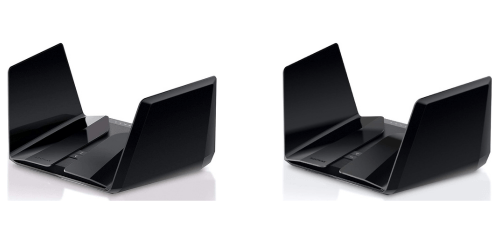
Why Do I Recommend The Netgear RAX200?
- The Netgear RAX200 has a tri-band WiFi architecture with two separate 5GHz radios for distributing wireless clients across dedicated high-speed channels to reduce congestion in busy networks, while the Netgear RAX120 uses a dual-band architecture with a single 5GHz radio.
- Netgear RAX200 features an AX11000 speed rating for supporting combined wireless throughput up to 10.8Gbps across three bands in high-demand environments, whereas the Netgear RAX120 uses an AX6000 rating limited to 6.0Gbps total throughput.
- It includes two independent 4×4 5GHz radios for separating high-bandwidth activities such as gaming and 4K streaming onto different frequency blocks, while the Netgear RAX120 uses one 8×8 5GHz radio handling all 5GHz traffic on a single band.
- The Netgear RAX200 supports Smart Connect across three bands for automatically steering devices between 2.4GHz and two 5GHz radios to balance network load dynamically, whereas the Netgear RAX120 supports Smart Connect across only two bands.
- Netgear RAX200 has dual 160MHz-capable 5GHz radios to enable two separate high-throughput channels for compatible WiFi 6 devices, while the Netgear RAX120 has a single 160MHz-capable 5GHz radio.
- It includes a configurable multi-gig 2.5GbE port for flexible WAN or LAN deployment in multi-device wired setups, whereas the Netgear RAX120 uses a single 5GbE port.
- The Netgear RAX200 supports tri-band load segmentation for isolating IoT, streaming, and gaming devices onto different wireless bands to maintain consistent latency under heavy traffic, while the Netgear RAX120 concentrates all 5GHz devices on one band.
- Netgear RAX200 supports up to 50 connected devices to maintain stable performance in dense smart-home environments, while the Netgear RAX120 is rated for up to 30 connected devices.
Maybe the Netgear RAX120 can make you comfortable because it’s a little bit cheaper than the Netgear RAX200. But you have to compromise all the above-mentioned features. Now the Decision is Yours. I hope it was helpful to choose the right one.
Side-by-Side Comparison
| Feature | Netgear RAX200 | Netgear RAX120 |
| WiFi class | AX11000 | AX6000 |
| Band count | Tri-band | Dual-band |
| Radio layout | 2.4GHz + 5GHz + 5GHz | 2.4GHz + 5GHz |
| Advertised max WiFi speed | 10.8 Gbps | 6.0 Gbps |
| Extra 5GHz band max PHY rate | 4.8 Gbps | N/A |
| 5GHz radio (Tx/Rx) | 4×4 + 4×4 | 8×8 |
| 5GHz radio count | 2 | 1 |
| 160MHz support (5GHz radios) | 2 radios | 1 radio |
| Gigabit port role breakdown | Configurable | 1 WAN + 4 LAN |
| Port aggregation wording | 2× Gigabit LAN + 2× Gigabit WAN | Dual Gigabit Ethernet port aggregation |
| Rated device capacity | Up to 50 devices | Up to 30 devices |
| Folded size (in) | 11.7 x 8.7 x 3.1 in | 11.81 x 8.76 x 3.35 in |
| Folded size (mm) | 298 x 221.2 x 78 mm | 300 x 222.4 x 85.2 mm |
| Price | Check Netgear RAX200 Price | Check Netgear RAX120 Price |
What Common Both Can Do?
- WiFi 6 (802.11ax) Support: Both routers support the WiFi 6 standard, enabling higher efficiency, reduced latency, and improved performance in dense network environments. This ensures better handling of multiple simultaneous devices such as smartphones, laptops, smart TVs, and IoT devices.
- 2.4GHz Band: Each model includes a 2.4GHz band for extended coverage and compatibility with legacy devices. This band is useful for smart home gadgets and devices that prioritize range over speed.
- 5GHz Band: Both routers support 5GHz connectivity, delivering faster data rates and lower interference compared to 2.4GHz. This band is ideal for gaming, 4K streaming, and large file transfers.
- OFDMA: Both routers utilize Orthogonal Frequency Division Multiple Access technology, which divides channels into smaller resource units for more efficient data transmission. This improves network efficiency when many devices are connected simultaneously.
- MU-MIMO: Each router supports Multi-User Multiple Input Multiple Output technology, allowing multiple devices to receive data at the same time. This reduces waiting time and improves overall network responsiveness.
- 160MHz Channel Width: Both devices support 160MHz channels on 5GHz, enabling higher theoretical throughput for compatible WiFi 6 clients. This benefits high-bandwidth applications such as ultra-high-definition streaming and large downloads.
- Beamforming+: Both models use beamforming technology to focus WiFi signals directly toward connected devices. This enhances signal stability and reduces dead zones within the coverage area.
- WPA3 Security: Each router supports WPA3 encryption for stronger password protection and improved network security. This helps safeguard connected devices against unauthorized access.
- 64-bit Quad-Core Processor: Both routers are powered by 64-bit quad-core processors, allowing smooth handling of high network traffic and advanced features. This ensures consistent performance during heavy multitasking.
- USB 3.0 Port: Both models include a USB 3.0 port for connecting external storage devices. This allows network file sharing or media streaming across connected devices.
- 5 × Gigabit Ethernet Ports: Each router provides five Gigabit Ethernet ports for high-speed wired connections. This is useful for gaming consoles, desktop PCs, and NAS systems requiring stable wired bandwidth.
- Link Aggregation: Both routers support Ethernet port aggregation for higher combined wired throughput. This is beneficial for users with compatible NAS devices or high-speed internet plans.
- Dynamic QoS: Each router includes Dynamic Quality of Service features to prioritize traffic such as gaming and streaming. This helps maintain stable performance during peak usage times.
- Smart Connect: Both routers feature Smart Connect, automatically steering devices to the most appropriate WiFi band. This simplifies network management and optimizes connection efficiency.
- Nighthawk App Support: Each model is compatible with the Nighthawk mobile app for setup, monitoring, and management. This allows users to control their network settings conveniently from a smartphone.
- Amazon Alexa Support: Both routers integrate with Amazon Alexa for voice-based network control. This enables simple commands for checking network status or enabling guest WiFi.
- VPN Support: Each router supports VPN functionality for secure remote access. This enhances privacy and allows encrypted connections when accessing the home network remotely.
- Parental Controls: Both models provide parental control features to manage internet access and content filtering. This helps maintain a safer browsing environment for children and family members.
Common Features
| Feature | Netgear RAX200 | Netgear RAX120 |
| WiFi 6 (802.11ax) Support | Yes | Yes |
| 2.4GHz Band | Yes | Yes |
| 5GHz Band | Yes | Yes |
| OFDMA | Yes | Yes |
| MU-MIMO | Yes | Yes |
| 160MHz Channel Width | Yes | Yes |
| Beamforming+ | Yes | Yes |
| WPA3 Security | Yes | Yes |
| 64-bit Quad-Core Processor | Yes | Yes |
| USB 3.0 Port | Yes | Yes |
| 5 × Gigabit Ethernet Ports | Yes | Yes |
| Link Aggregation | Yes | Yes |
| Dynamic QoS | Yes | Yes |
| Smart Connect | Yes | Yes |
| Nighthawk App Support | Yes | Yes |
| Amazon Alexa Support | Yes | Yes |
| VPN Support | Yes | Yes |
| Parental Controls | Yes | Yes |
| Price | Check Netgear RAX200 Price | Check Netgear RAX120 Price |
FAQ
What WiFi standard do Netgear RAX200 and Netgear RAX120 support? Do both routers support 160MHz channel width? Is MU-MIMO available on both models? Do Netgear RAX200 and RAX120 include OFDMA technology? Do both routers offer multi-gig Ethernet connectivity? How many wired Ethernet ports are available on each router? Do both routers support link aggregation? Are these routers compatible with the Nighthawk app? Do both models support WPA3 security? Is beamforming technology included in both routers? Can both routers create a guest network? Do the routers include USB ports for storage sharing? Are parental controls available on both models? Do both routers support VPN functionality? Are these routers suitable for high-device households? |