Acer Predator & Acer Nitro share many similarities, but there are also important differences, such as quality, performance, features, design, and connectivity. If you want the best one between them, I Would recommend the Acer Predator rather than the Acer Nitro.
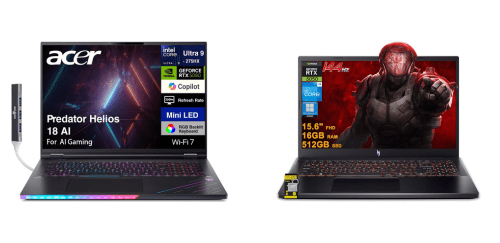
Why Do I Recommend The Acer Predator?
- The Acer Predator has higher GPU power limits to deliver more stable high-frame-rate gaming and better performance in demanding titles, while Acer Nitro uses lower GPU wattage configurations.
- Acer Predator features advanced cooling systems for sustained peak performance during long gaming sessions, whereas Acer Nitro uses simpler dual-fan cooling designs.
- It includes higher-refresh-rate display options to enable smoother motion and reduced blur in fast-paced competitive games, while Acer Nitro supports lower maximum refresh rates.
- The Acer Predator comes with higher-tier CPU configurations to handle intensive multitasking and CPU-heavy workloads more efficiently, while Acer Nitro relies on mid-range processor options.
- Acer Predator supports premium display technologies for improved brightness consistency and color accuracy during gaming and creative work, whereas Acer Nitro uses standard IPS panels.
- It includes more advanced system control software to allow deeper fan tuning and performance customization, while Acer Nitro uses more limited control utilities.
- The Acer Predator has a reinforced chassis design to improve durability and thermal stability under heavy loads, while the Acer Nitro uses lighter plastic-based construction.
- Acer Predator supports higher-end connectivity options to ensure faster data transfer and broader peripheral compatibility, whereas Acer Nitro includes more basic port configurations.
Maybe the Acer Nitro price can make you comfortable because it’s a little bit cheaper than the Acer Predator. But you have to compromise all the above-mentioned features. Now the Decision is Yours. I hope it was helpful to choose the right one.
Side By Side Comparison
| Feature | Acer Predator | Acer Nitro |
| GPU Class | RTX 4090 | RTX 3050 |
| CPU | Ryzen 7 / 9 | Ryzen 5 / 7 |
| Max TGP | Higher wattage | Lower wattage |
| Cooling Design | Vapor chamber + multi-fan | Dual-fan air cooling |
| Thermal Headroom | High | Moderate |
| Display Refresh Rate | 240Hz–300Hz | 144Hz–165Hz |
| Display Panel Type | QHD | FHD |
| Color Gamut | Wide gamut | Standard gamut |
| Brightness Level | Higher nits | Lower nits |
| Chassis Material | Metal | Plastic composite |
| Weight Class | Heavy | Lighter |
| Keyboard Lighting | Per-key or 4-zone RGB | 4-zone RGB / red |
| Key Travel | Deeper | Shallower |
| Port Count | More ports | Fewer ports |
| Thunderbolt | Available | Limited / none |
| Wi-Fi Standard | Wi-Fi 6E | Wi-Fi 6 |
| Audio Tuning | Enhanced | Standard |
| Control Software | Predator Sense | Nitro Sense |
| Overclocking | Supported | Not supported |
| Fan Control | Advanced manual | Limited |
| Battery Capacity | Larger | Smaller |
| Power Adapter | High-wattage | Lower-wattage |
| Price | Check Acer Predator Price | Check Acer Nitro Price |
What Common Both Can Do?
- Gaming Laptop Category: Both Acer Predator and Acer Nitro are designed as gaming-focused laptops built to handle demanding workloads. This ensures compatibility with modern games and performance-intensive applications.
- Dedicated Graphics Card: Each series includes a discrete GPU rather than relying on integrated graphics. This allows smoother gameplay, higher frame rates, and better support for modern graphics technologies.
- High-Refresh-Rate Display: Both models feature displays with refresh rates higher than standard 60Hz panels. This results in smoother motion and reduced screen tearing during fast-paced gaming.
- IPS Display Technology: Acer Predator and Acer Nitro use IPS panels for wider viewing angles and more consistent colors. This improves both gaming immersion and general visual quality.
- RGB Keyboard Backlighting: Both laptops include backlit keyboards with RGB lighting support. This enhances visibility in low-light environments and adds gaming-style aesthetics.
- Windows Operating System: Each series runs on the Windows operating system by default. This provides broad game compatibility, driver support, and access to gaming platforms.
- SSD Storage Support: Both Acer Predator and Acer Nitro use solid-state storage for faster boot times and quicker game loading. SSDs significantly improve overall system responsiveness.
- Dual-Fan Cooling System: Both models rely on dual-fan cooling setups to manage heat. This helps maintain stable performance during extended gaming sessions.
- HDMI Output: Each laptop includes an HDMI port for external display connectivity. This allows easy connection to monitors, TVs, or projectors.
- USB Type-A Ports: Both series provide multiple USB-A ports for peripherals. This supports gaming mice, keyboards, controllers, and external storage.
- USB Type-C Port: Acer Predator and Acer Nitro include USB-C connectivity. This enables modern accessories, data transfer, and external device support.
- Wi-Fi Connectivity: Both laptops support modern Wi-Fi standards for wireless internet access. This ensures stable online gaming and fast downloads.
- Bluetooth Support: Each series includes Bluetooth functionality for wireless peripherals. This allows users to connect headsets, controllers, and other devices easily.
- Built-in Webcam: Both laptops feature an integrated webcam. This supports video calls, online classes, and streaming needs.
- Stereo Speakers: Acer Predator and Acer Nitro include built-in stereo speakers. This provides basic audio output without requiring external speakers or headphones.
- Gaming Control Software: Both models come with Acer’s proprietary control software. This allows users to monitor system performance and manage basic gaming settings.
- Full-Size Keyboard Layout: Each laptop uses a full-size keyboard design. This improves typing comfort and usability for both gaming and productivity.
Common Features
| Feature | Acer Predator | Acer Nitro |
| Gaming Laptop Category | Yes | Yes |
| Dedicated Graphics Card | Yes | Yes |
| High-Refresh-Rate Display | Yes | Yes |
| IPS Display Technology | Yes | Yes |
| RGB Keyboard Backlighting | Yes | Yes |
| Windows Operating System | Yes | Yes |
| SSD Storage Support | Yes | Yes |
| Dual-Fan Cooling System | Yes | Yes |
| HDMI Output | Yes | Yes |
| USB Type-A Ports | Yes | Yes |
| USB Type-C Port | Yes | Yes |
| Wi-Fi Connectivity | Yes | Yes |
| Bluetooth Support | Yes | Yes |
| Built-in Webcam | Yes | Yes |
| Stereo Speakers | Yes | Yes |
| Gaming Control Software | Yes | Yes |
| Full-Size Keyboard Layout | Yes | Yes |
| Price | Check Acer Predator Price | Check Acer Nitro Price |