Netgear GS105E & Netgear GS105 share many similarities, but there are also important differences, such as quality, performance, features, design, and connectivity. If you want the best one between them, I Would recommend the Netgear GS105E rather than the Netgear GS105.
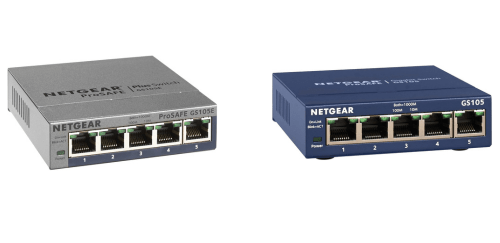
Why Do I Recommend The Netgear GS105E?
- The Netgear GS105E supports IEEE 802.1Q VLAN and port-based VLAN configuration for segmenting traffic into separate networks such as guest, IoT, and office devices to improve security and traffic isolation, while the Netgear GS105 uses an unmanaged design with no VLAN capability.
- Netgear GS105E features 802.1p and DSCP-based QoS controls for prioritizing latency-sensitive traffic like VoIP calls and video conferencing to maintain stable real-time communication, whereas the Netgear GS105 comes with no configurable QoS settings.
- It includes static link aggregation for combining multiple ports into a single logical connection to increase bandwidth to a NAS or upstream switch, while the Netgear GS105 supports only standalone individual ports.
- The Netgear GS105E supports IGMP Snooping for optimizing multicast traffic such as IPTV streams by forwarding data only to subscribed ports to reduce unnecessary bandwidth usage, while the Netgear GS105 forwards multicast traffic to all ports.
- Netgear GS105E comes with per-port rate limiting controls to define maximum ingress or egress bandwidth for preventing a single device from consuming excessive network capacity, whereas the Netgear GS105 has no bandwidth management features.
- It includes port mirroring for duplicating traffic from one port to another for network diagnostics and packet analysis during troubleshooting, while the Netgear GS105 does not support traffic monitoring functions.
- The Netgear GS105E features cable diagnostics and detailed per-port statistics for identifying faulty cables and analyzing traffic errors to speed up network troubleshooting, while the Netgear GS105 provides only basic link and activity LEDs.
- Netgear GS105E supports configuration backup and password-protected management access for securing administrative control and preserving custom network settings, whereas the Netgear GS105 uses a fixed factory configuration with no management interface.
Maybe the Netgear GS105 can make you comfortable because it’s a little bit cheaper than the Netgear GS105E. But you have to compromise all the above-mentioned features. Now the Decision is Yours. I hope it was helpful to choose the right one.
Side-by-Side Comparison
| Feature | Netgear GS105E | Netgear GS105 |
| Management | Web-managed | Unmanaged |
| Web GUI | Yes | No |
| VLAN | 802.1Q VLAN, port-based VLAN | Not supported |
| VLAN tag control | Per-port tag/untag | Not supported |
| QoS | 802.1p/DSCP QoS | Not supported |
| QoS method | Port-based priority, 802.1p | Not supported |
| IGMP Snooping | Yes | Not supported |
| Link aggregation | Static LAG / port trunking | Not supported |
| LAG groups | Configurable | Not supported |
| Port mirroring | Yes | Not supported |
| Rate limiting | Per-port ingress/egress control | Not supported |
| Storm control | Broadcast/multicast storm control | Not supported |
| Loop detection | Yes | Not supported |
| Cable diagnostics | Cable test | Not supported |
| Port statistics | Detailed per-port counters | Not supported |
| Configuration save/restore | Yes | Not applicable |
| Admin access control | Password-protected management | Not applicable |
| Jumbo frame control | Configurable | Not configurable |
| Energy Efficient Ethernet control | Configurable | Not configurable |
| Price | Check Netgear GS105E Price | Check Netgear GS105 Price |
What Common Both Can Do?
- Total Ports: Both switches provide five Ethernet ports, making them suitable for small office or home network expansions. This allows users to connect multiple wired devices such as PCs, smart TVs, NAS units, or gaming consoles without requiring additional hardware.
- Port Speed: Each model supports 10/100/1000 Mbps per port, enabling Gigabit Ethernet connectivity. This ensures compatibility with both legacy Fast Ethernet devices and modern high-speed network equipment.
- Switching Capacity: Both units feature a 10 Gbps switching capacity, which supports full-duplex Gigabit traffic across all ports simultaneously. This helps maintain stable performance when multiple devices are transferring data at the same time.
- Switching Architecture: Both use store-and-forward switching, which checks data packets for errors before forwarding them. This improves overall transmission reliability and reduces corrupted frame propagation.
- Auto-Negotiation: Each port automatically negotiates the highest supported speed and duplex mode. This simplifies setup and ensures optimal link performance without manual configuration.
- Auto MDI/MDIX: Both models support automatic crossover detection, allowing standard Ethernet cables to be used without concern for cable type. This removes the need for special crossover cables in typical installations.
- Jumbo Frame Support: Both switches support jumbo frames up to 9KB. This improves efficiency for large file transfers, especially in environments using NAS devices or media servers.
- IEEE 802.3i: Compliance with IEEE 802.3i ensures compatibility with 10 Mbps Ethernet devices. This maintains backward compatibility with older networking equipment.
- IEEE 802.3u: Support for IEEE 802.3u enables Fast Ethernet (100 Mbps) operation. This allows integration with devices that do not support Gigabit speeds.
- IEEE 802.3ab: Both switches comply with IEEE 802.3ab for Gigabit Ethernet over twisted pair cabling. This ensures reliable 1000 Mbps performance over Cat5e or higher cables.
- IEEE 802.3x Flow Control: Flow control support helps prevent packet loss during congestion by managing data transmission between connected devices. This contributes to smoother network performance under heavy load.
- Energy Efficient Ethernet (IEEE 802.3az): Both switches implement IEEE 802.3az to reduce power consumption during periods of low network activity. This can lower energy usage in always-on network setups.
- LED Indicators: Each model includes LED indicators for power and per-port link/activity status. These visual indicators assist in troubleshooting and confirming active connections.
- Enclosure Type: Both switches use a metal housing, which improves durability and structural strength. The metal design also helps with passive heat dissipation.
- Cooling: Both units are fanless, resulting in silent operation. This makes them suitable for placement in home offices, media cabinets, or quiet work environments.
- Mounting Options: Both switches can be placed on a desktop or mounted on a wall. This flexibility supports different installation layouts and space constraints.
- Power Adapter Type: Each model uses an external power adapter rather than an internal power supply. This design simplifies replacement and reduces internal heat buildup.
- MAC Address Table: Both switches support up to 8,000 MAC address entries. This capacity is adequate for small to medium network environments with multiple connected devices.
- Operating Temperature Range: Both models are rated for operation between 0°C and 40°C. This range supports typical indoor networking environments without requiring specialized cooling systems.
Common Features
| Feature | Netgear GS105E | Netgear GS105 |
| Total Ports | 5 Ports | 5 Ports |
| Port Speed | 10/100/1000 Mbps | 10/100/1000 Mbps |
| Switching Capacity | 10 Gbps | 10 Gbps |
| Switching Architecture | Store-and-Forward | Store-and-Forward |
| Auto-Negotiation | Yes | Yes |
| Auto MDI/MDIX | Yes | Yes |
| Jumbo Frame Support | Up to 9KB | Up to 9KB |
| IEEE 802.3i | Yes | Yes |
| IEEE 802.3u | Yes | Yes |
| IEEE 802.3ab | Yes | Yes |
| IEEE 802.3x Flow Control | Yes | Yes |
| Energy Efficient Ethernet (IEEE 802.3az) | Yes | Yes |
| LED Indicators | Power, Link/Activity per port | Power, Link/Activity per port |
| Enclosure Type | Metal housing | Metal housing |
| Cooling | Fanless | Fanless |
| Mounting Options | Desktop or wall-mount | Desktop or wall-mount |
| Power Adapter Type | External power adapter | External power adapter |
| MAC Address Table | 8K entries | 8K entries |
| Operating Temperature Range | 0°C to 40°C | 0°C to 40°C |
| Price | Check Netgear GS105E Price | Check Netgear GS105 Price |