Netgear CM700 & Netgear CM600 Series share many similarities, but there are also important differences, such as quality, performance, features, design, and connectivity. If you want the best one between them, I Would recommend the Netgear CM700 rather than the Netgear CM600.
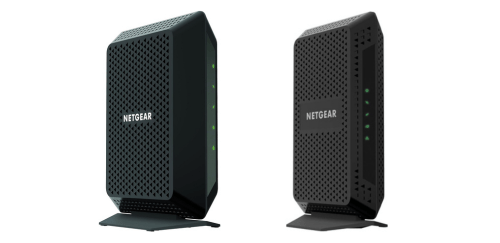
Why Do I Recommend The Netgear CM700?
- The Netgear CM700 has 32×8 channel bonding for supporting up to 1.4 Gbps theoretical downstream throughput and maintaining higher bandwidth availability during peak ISP congestion, while the Netgear CM600 uses 24×8 channel bonding.
- Netgear CM700 supports up to 800 Mbps internet plans for handling higher-tier cable subscriptions without channel saturation, whereas the Netgear CM600 supports up to 600 Mbps plans.
- It has 32 downstream channels for distributing data traffic across more bonded channels to reduce the likelihood of speed drops under heavy neighborhood usage, while the Netgear CM600 has 24 downstream channels.
- The Netgear CM700 features a 1.4 Gbps maximum DOCSIS 3.0 downstream capacity for accommodating faster ISP provisioning and higher aggregate throughput, compared to the Netgear CM600’s 960 Mbps maximum downstream capacity.
- Netgear CM700 comes with a 167 × 132 × 69 mm chassis for occupying less desk space and fitting more easily in compact networking setups, whereas the Netgear CM600 measures 222 × 136 × 87 mm.
- It has a 0.25 kg weight for lighter mounting and easier placement on wall brackets or shelves, while the Netgear CM600 weighs approximately 0.45 kg.
- The Netgear CM700 features a 7.5 W idle power draw for lower continuous electricity consumption during standby operation, compared to the Netgear CM600’s approximately 8.2 W idle power draw.
- Netgear CM700 has a 10.1 W active power draw for reduced electrical load during sustained high-speed data transfers, whereas the Netgear CM600 operates at approximately 11.4 W active power consumption.
Maybe the Netgear CM600 can make you comfortable because it’s a little bit cheaper than the Netgear CM700. But you have to compromise all the above-mentioned features. Now the Decision is Yours. I hope it was helpful to choose the right one.
Side-by-Side Comparison
| Feature | Netgear CM700 | Netgear CM600 |
| Downstream channel count | 32 | 24 |
| Max downstream throughput (DOCSIS 3.0) | 1400 Mbps | 960 Mbps |
| Max supported Internet plan | 800 Mbps | 600 Mbps |
| Channel bonding type | 32×8 | 24×8 |
| Operating humidity max | 95 % | 90 % |
| Dimensions (length) | 167 mm | 222 mm |
| Dimensions (width) | 132 mm | 136 mm |
| Dimensions (height) | 69 mm | 87 mm |
| Weight | 0.25 kg | 0.45 kg |
| Price | Check Netgear CM700 Price | Check Netgear CM600 Price |
What Common Both Can Do?
- DOCSIS Version: Both models use DOCSIS 3.0 technology, which enables high-speed broadband connectivity over cable networks. This standard supports channel bonding to increase bandwidth efficiency and maintain stable performance on compatible ISPs.
- Backward Compatibility: Each modem supports DOCSIS 2.0 networks, allowing operation in areas where older infrastructure is still deployed. This ensures broader compatibility with legacy cable systems.
- Gigabit Ethernet Port: Both devices include a single 10/100/1000 Mbps Ethernet port. This allows connection to a separate WiFi router or wired device at full gigabit speeds without internal bottlenecks.
- Router Built-In: Neither model includes a built-in router. This design allows users to pair the modem with a router of their choice for customized networking performance.
- WiFi Built-In: Both units function strictly as cable modems without integrated wireless radios. This separation improves flexibility in home network configuration.
- IPv6 Support: Each modem supports IPv6 networking. This ensures compatibility with modern internet addressing standards and future-proofs the connection.
- Downstream Modulation: Both models use 64/256 QAM modulation for downstream data transmission. This modulation type improves data efficiency and stability over cable lines.
- Upstream Modulation: Each modem supports multiple QAM upstream modulation schemes. This allows adaptive performance depending on ISP signal conditions.
- Ethernet Auto-Negotiation: Both automatically detect and negotiate the best Ethernet speed supported by the connected device. This ensures optimal performance without manual configuration.
- Auto-Sensing Ethernet: Each modem can automatically detect active network devices when connected. This simplifies installation and reduces configuration steps.
- LED Status Indicators: Both feature front-panel LED indicators for power, downstream, upstream, internet, and Ethernet activity. These lights provide immediate visual diagnostics for troubleshooting.
- Vertical Stand Design: Each modem uses a vertical tower form factor. This orientation reduces desktop footprint and improves airflow for passive cooling.
- ISP Compatibility: Both models are approved for use with major US cable providers. This ensures activation support and standardized provisioning procedures.
- Plug-and-Play Setup: Each device supports simple activation through ISP registration processes. Users typically connect the coaxial cable and Ethernet cable before completing ISP provisioning online.
- Coaxial Cable Interface: Both include a single F-type coaxial connector for cable signal input. This is the industry standard for residential cable broadband.
- Power Adapter Included: Each modem ships with an external power adapter. This provides regulated voltage appropriate for internal circuitry and stable long-term operation.
- Firmware Updates via ISP: Both models receive firmware updates directly from the internet service provider. This maintains network compatibility and security compliance.
- Operating Humidity: Each modem is rated for operation within typical residential humidity ranges without condensation. This ensures stable performance in common indoor environments.
Common Features
| Feature | Netgear CM700 | Netgear CM600 |
| DOCSIS Version | DOCSIS 3.0 | DOCSIS 3.0 |
| Backward Compatibility | DOCSIS 2.0 | DOCSIS 2.0 |
| Gigabit Ethernet Port | 1 × 10/100/1000 Mbps | 1 × 10/100/1000 Mbps |
| Router Built-In | No | No |
| WiFi Built-In | No | No |
| IPv6 Support | Yes | Yes |
| Downstream Modulation | 64/256 QAM | 64/256 QAM |
| Upstream Modulation | 8/16/32/64/128 QAM | 8/16/32/64/128 QAM |
| Ethernet Auto-Negotiation | Yes | Yes |
| Auto-Sensing Ethernet | Yes | Yes |
| LED Status Indicators | Yes | Yes |
| Vertical Stand Design | Yes | Yes |
| ISP Compatibility | Major US cable providers | Major US cable providers |
| Plug-and-Play Setup | Yes | Yes |
| Coaxial Cable Interface | 1 × F-type connector | 1 × F-type connector |
| Power Adapter Included | Yes | Yes |
| Firmware Updates via ISP | Yes | Yes |
| Operating Humidity | 90–95% non-condensing | 90–95% non-condensing |
| Price | Check Netgear CM700 Price | Check Netgear CM600 Price |
FAQ
Is Netgear CM700 compatible with all cable internet providers? Is Netgear CM600 compatible with the same ISPs as Netgear CM700? What is the main performance difference between Netgear CM700 and Netgear CM600? Do Netgear CM700 and Netgear CM600 have built-in WiFi? How many Ethernet ports are available on both modems? Do both models support IPv6? What DOCSIS standard do Netgear CM700 and CM600 use? Can Netgear CM700 and CM600 be used for gaming? What is the maximum supported internet plan for Netgear CM700? What is the maximum supported internet plan for Netgear CM600? Do both modems support backward compatibility with DOCSIS 2.0? Are firmware updates handled automatically on both models? Do Netgear CM700 and CM600 include phone line support? Is there a difference in physical size between Netgear CM700 and CM600? Do both modems require a separate router for a home network? |